Multi-Vendor Marketplace Development

Build, Manage and Scale Your Multi-Vendor Business

Hero Banner

A multi-vendor marketplace is not just an eCommerce website. This is an ecosystem of buyers, vendors, administrators, products, stock, orders, commissions, payments and fulfilment, tied to customer support.

At PerfectKode, we build multi-vendor marketplace platforms tailored to integrate these interrelated workflows within a single scalable technology ecosystem. We offer marketplace software development solutions to startups, SMEs, and enterprises for building digital marketplaces across business model verticals.

What Is a Multi-Vendor Marketplace?

The multi-vendor marketplace is an online platform where multiple independent sellers can trade their goods or services. This marketplace is managed and moderated by the Marketplace operator. Unlike a single online store, a multi-vendor marketplace brings together several traders, a product catalog, and business processes under one platform. Each trader has their own account, dashboard, inventory, pricing, product catalog, order management system, sales reports, and customer support. At the same time, buyers get access to the catalog of goods and services of multiple sellers in one place. Such a marketplace is convenient for both sides: the customer finds the product they are looking for quickly and the seller gets new customers. The marketplace owner manages and moderates the platform, sets up and administers accounts, approves sales, collects payments, administers customer service, and performs other functions.

The marketplace business model may also involve differences in the seller account: rates, payment terms, available functions, inventory management, and other characteristics.Such marketplaces can be developed in different verticals, for example, for selling both physical and digital products, services, rentals, or events. A multi-vendor marketplace is a powerful tool that helps increase sales for multiple businesses. The platform owner can develop an administrative panel with the necessary functionality for sellers and customers. The software can be customized to meet the specific needs of a particular business and its marketplace customers.

-what-is-multi-vendor-marketplace
0+
Years of Technology Experience
0+
Business Solutions Delivered
0+
Marketplace Workflows Digitized
0+
Integrations Delivered

One Platform For Your Whole Marketplace

Vendors. Products. Customers. Orders. Payments. Growth.

Vendor registration

Vendor registration

Vendor onboarding

Vendor onboarding

KYC and verification workflows

KYC and verification workflows

Vendor approval

Vendor approval

Vendor dashboard

Vendor dashboard

Storefront management

Storefront management

Product management

Product management

Catalog management

Catalog management

Inventory

Inventory

Pricing

Pricing

Orders

Orders

Multi-vendor cart

Multi-vendor cart

Order splitting

Order splitting

Commission management

Commission management

Payment collection

Payment collection

Vendor payouts

Vendor payouts

Shipping integration

Shipping integration

Customer management

Customer management

Reviews and ratings

Reviews and ratings

Dispute management

Dispute management

Vendor performance

Vendor performance

Marketplace analytics

Marketplace analytics

Admin management

Admin management

Role-based permissions

Role-based permissions

API integrations

API integrations

How Do Multi-Vendor Marketplaces Work?

A multi-vendor marketplace is a platform with multiple sellers, suppliers, service providers and customers, along with a marketplace administrator on a single digital platform. A marketplace brings all vendors to one roof, so instead of managing individual systems in terms of products, orders, payment, inventory and customer inquires.

Functions of a multi-vendor marketplace

Customers browse products or services

The marketplace allows customers to discover products, compare vendors, see pricing and availability, read product information and order.

Vendors manage their stores

Each vendor has its own dashboard, where they can add products, update prices, manage inventory, process orders and track their sales.

Orders reach the right vendors

The marketplace finds the appropriate vendor when a customer places an order, and it sends the details to prepare their order. In case the items on an order belong to different vendors, it can manage the order based on the defined workflow of the marketplace.

Payments and commissions are managed centrally

The marketplace could receive payments from customers automatically for vendor commissions, platform fees or taxes. Once paid, suppliers can then receive their eligible accruals following whichever payment cycle has been set-up.

Inventory stays updated

Vendors can manage their stock levels from dashboards. Inventory data can update and sync with orders to show customers a better read on product availability.

Shipping and fulfilment are coordinated

It can also link with shipping and logistics providers to enable order fulfilment, shipment tracking, delivery updates, etc.

Customers receive order updates

Notifications are used to provide customers with order updates such as confirmation alerts, order processing status, shipment notice and delivery notification, refunds due to cancellations and more.

Administrators control marketplace operations

From a single dashboard, marketplace administrators can approve vendors, check products, manage customers, set up commissions, track orders or disputes and much more.

Reports help track marketplace performance

You can leverage your dashboard and reports for different business metrics such as sales, vendor performance, commissions, orders, inventory, and customers.

These functions are what make the multi-vendor marketplace powerful. A customer order can initiate various related processes like notifying a vendor, updating the inventory, payment processing and commission calculation, shipping, and notifying the customer.

This connected model enables marketplace owners to retain control over multiple independent vendors while providing a unified shopping experience for customers. Vendors receive the tools to manage their own shops while administrators keep inside visibility and control over the full marketplace.

01

Vendor registration

A registration system for new sellers can be created by the marketplace itself. Vendors fill out their business name, contact details, required product categories and so on. This allows for a central space to store registration data and then review it before onboarding further.

02

Vendor onboarding

Vendor onboarding can help in leading the sellers through every step that is needed for them to get active on the platform. This can include entering their profile, adding business information, setting payment options, uploading documents and accepting marketplace terms.

03

KYC and verification workflows

The platform gathers documents as well as business information needed for verification of the vendor. When administrators review submitted documents, they will have the ability to verify what those look like or request any other document. That gives vendor verification a clear and rigid structure.

04

Vendor approval

First, an administrator reviews any vendor applications before granting them selling access. You could incorporate manual review, verification checks, workload by categories, or even proof of handling needs into approval workflows. Marketplace policies are also not followed, thus, vendors who break them keep themselves suspended or deactivated.

05

Vendor dashboard

For example, every vendor will get access to a separate panel that allows them to manage their marketplace. This dashboard shows orders, sales, inventory, products, earnings and customers and reviews etc. This offers vendors a centralized hub for managing their store.

06

Storefront management

Marketplaces enable vendors to set up and have their own storefront in the broader marketplace. You can manage their store information, description, branding, banners, contact info and product overview. Storefronts can be customized and structured to give customers uniform information across sellers.

07

Product management

Through their dashboard, vendors can input products, update them, delete them or fidget around with the order in which they appear. Product management may consist of product names, descriptions, images, specifications, variants, price and availability. The Products are also reviewed or approved by administrators before they can be viewed by customers.

08

Catalog management

A well-structured catalogue organizes large amounts of products with the help of multiple vendors. You can create catalogs that include categories, subcategories, collections, attributes and brands to classify products. This helps in making product discovery easy for customers and reduces workload on catalog management.

09

Inventory

It allows vendors to manage the status of stock on their products and variants across the marketplace. It also allows them to manually update stock levels or feed it from an external system via integrations. Another approach would be to link inventory information with the orders, reducing the risk of selling out-of-stock items.

10

Pricing

From the dashboard, sellers can set their product's price and also update it. Depending on the business model, product category, vendor or kind of customer, the marketplace could use different pricing structures. You can define more rules for discounts, promotional offers, bulk purchases or minimum order quantity.

11

Orders

The Ooder managemnet system provides transparency to the vendors and admins about the marketplace transactions. Vendors can check new orders, edit order status data, add fulfilment as well as cancellations or returns. Discover Orders are Managed in One Place across the Entire Marketplace

12

Multi-vendor cart

Allows customers to check out with products from different vendors in the same cart. Rather than forcing purchases from each vendor separately, the marketplace offers an integrated shopping experience. During checkout, the system carries all the vendors with whom you have an order and arranges them in a straight line.

13

Order splitting

One checkout of a customer can consist of items from multiple vendors. The marketplace is able to separate this transaction into individual vendor orders while retaining the association with the original customer order. From here, each vendor takes control over the fulfilment of their own products.

14

Commission management

Allows marketplace owners to set vendor commission structures, including per transaction types. Other types of business rules are fixed amount, percentage, product-based, or vendor-based commissions. Once this is set up, the system can continually calculate commissions based on your transactions.

15

Payment collection

The marketplace can be integrated with the payment gateways to receive customer payments in supported formats. You are trained on the payment history associated with customer orders, and each vendor transaction. It can also enable use cases like payment status tracking, refunds, failed transactions and other payment-based workflows.

16

Vendor payouts

Once an order is Placed the marketplace calculates how much a vendor would get paid. All these adjustments can include commission, platform fee adjustment, refunds, cancellations, etc. to get the final payout amount calculated for you! The payout status and transaction history can then be tracked by vendors and administrators.

17

Shipping integration

The marketplace can integrate with delivery services to fulfil orders more easily. Look for shipping services to calculate rates, create shipments, track and provide delivery updates as well as manage the shipping status. Depending on the marketplace model, different vendors may also leverage various fulfilment or shipping arrangements.

18

Customer management

The platform has the ability to preserve consumer profiles, including corresponding account and investment information. Admin can access order history, addresses, interactions, reviews, and a lot of marketplace activities. It gives a single view of customer relationships on the platform.

19

Reviews and ratings

Customers can rate and review the products or vendors based on his/her purchasing experience. Reviews enable customers to review sellers and products before making a purchase. Moderate Reviews: Admins can also moderate reviews and inappropriate or disputed content.

20

Dispute management

It can allow a specific workflow for dealing with customer vs vendor disputes. It can document issues related to orders, payments, returns and refunds, or damaged products after delivery as well as the quality of service. Cases that administrators investigate and coordinate resolution between parties.

21

Vendor performance

Marketplace admins can judge vendors with the help of various performance indicators. This can be anything from sales volume, order fulfilment, cancellations, returns, customer ratings on delivery time and response time etc. Performance information cannot only pinpoint vendors who are doing a dependable job but also those that need attention.

22

Marketplace analytics

Analytics tools are helpful to get a big picture of marketplace progress. Admin users can track revenue, orders, commissions, vendor activity and performance statistics — plus customer growth and product performance. Marketplace owners look at reports to identify trends and inform operational decisions.

23

Admin management

Marketplace owners can manage the entire platform from a centralized admin panel. Manage vendor, product, customer, order, commission, payment and category settings as well as site options. Various administrative functions can be controlled based on user roles.

24

Role-based permissions

Not all functions are required for each user of the marketplace. Role-based permissions enable the administrators to define what different users can view, edit, approve or manage. This means that dedicated access levels can be created for administrators, operations teams, finance teams, support staff, managers and other users as well.

25

API integrations

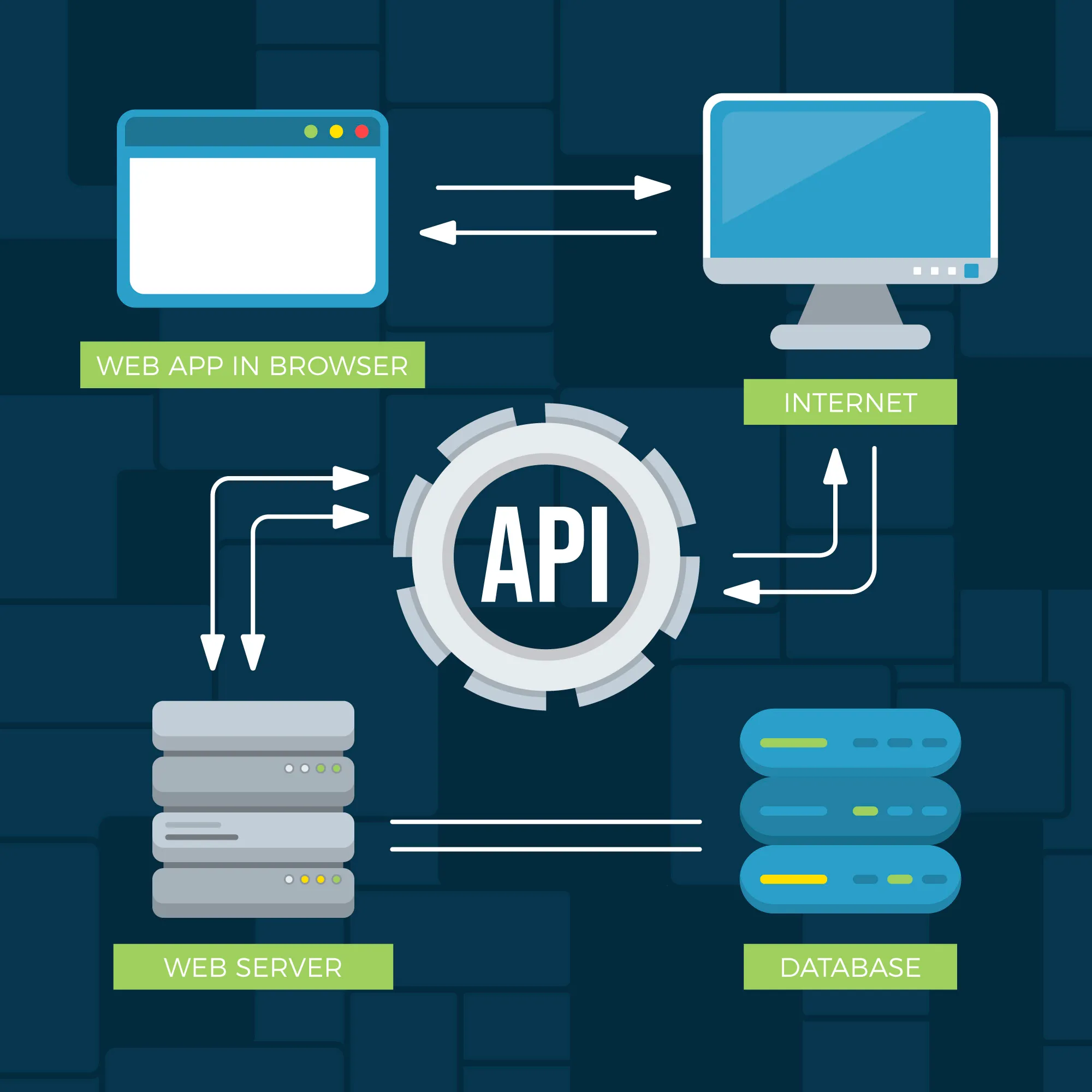
The API integrations let the marketplace interact with external software and services. Companies can integrate payment gateways, shipping services, customer relationship management solutions, enterprise resource planning tools, accounting applications, inventory software and other external systems. They help minimize manual data input and assist in maintaining system sync across all integrated tools.

How PerfectKode Helps Build a Multi-Vendor Marketplace

Vendor Onboarding Right Through to Marketplace Scale

PerfectKode is a solution that enables marketplace businesses to digitally transform the entire vendor lifecycle.

Vendor Onboarding

Registration, documentation, verification and approval.

Vendor Management

Provisioning of profiles, stores, products and performance and account management.

Catalog Management

Catalog management covering: Products, Categories, Attributes, Pricing, Images, Inventory.

Order Management

Shopper orders, Supplier orders, Order splitting, Fulfilment workflows.

Commission Management

Set up marketplace commissions and determine vendor settlements.

Payment & Payouts

Collaborate payment workflows with vendor settlement and payout systems.

Marketplace Administration

Manage: Vendors, Products, Customers, Orders, Disputes, Reports, Platform settings.

Why PerfectKode for Marketplace Development?

We Design for the Marketplace Ecosystem — Not Just the Website.

Buyer Experience

  • 1. Basic discovery
  • 2. Search
  • 3. Details about products
  • 4. Checkout
  • 5. Assistance

Vendor Experience

  • 1. Simple vendor onboarding
  • 2. Product management
  • 3. Inventory management
  • 4. Order management
  • 5. Earnings visibility

Operator Experience

Control over:

  • 1. Vendors
  • 2. Commissions
  • 3. Payments
  • 4. Products
  • 5. Customers
  • 6. Disputes
  • 7. Analytics

Instead, while designing the marketplace architecture, PerfectKode integrates these three perspectives.

Overview of Single-Vendor vs. Multi-Vendor Marketplaces

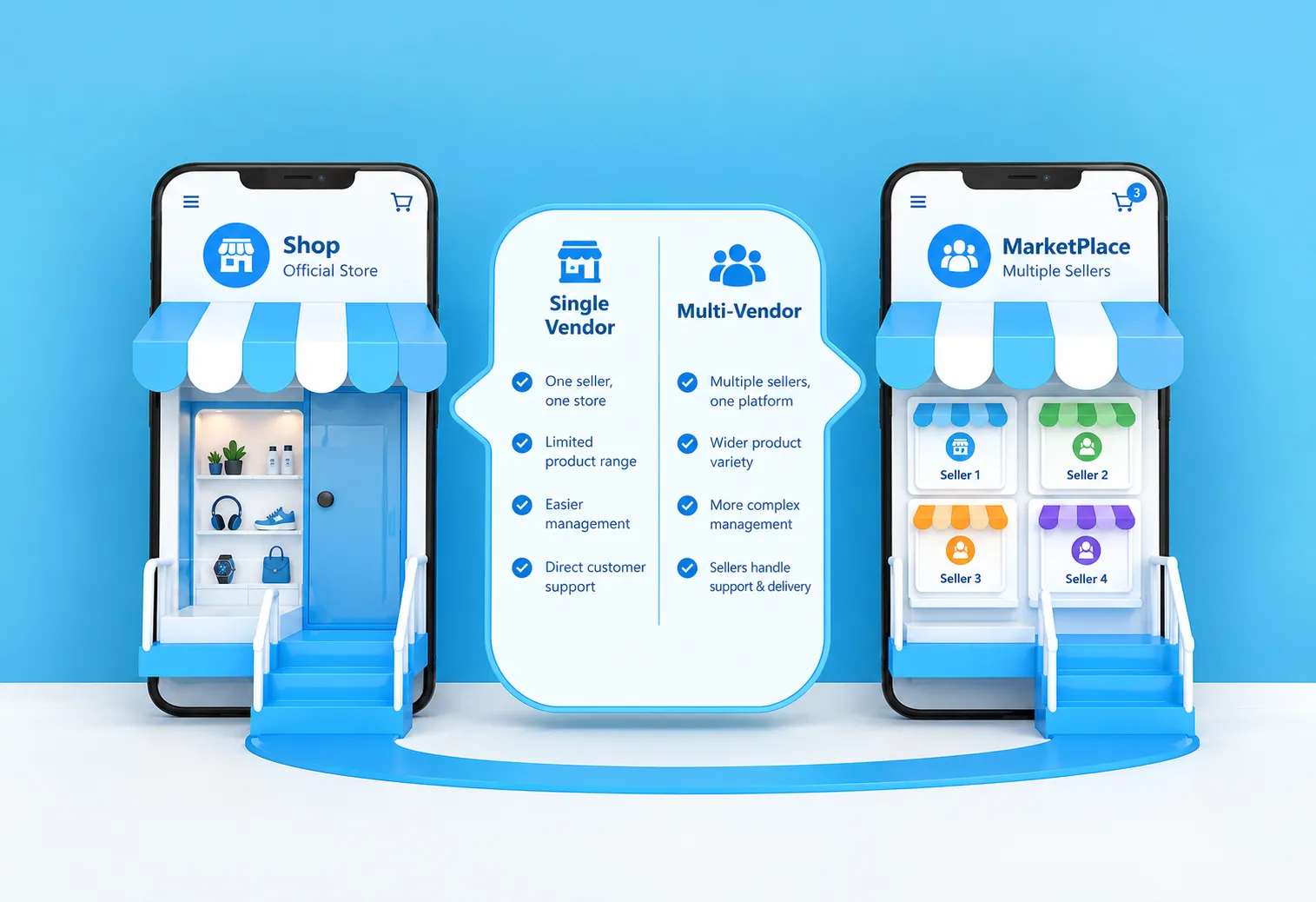
In a single-vendor marketplace, or you can say E-commerce store, typically revolve around one seller or business more. It is a way of managing your own products, customers, pricing, orders and payments from a central system for the business.

A multi-vendor marketplace behaves in a slightly different way. Here, various independent vendors can share the same marketplace to sell their products directly to customers. Each vendor has an account and operations but the marketplace owner drives the entire platform.That allows for more flexibility, but also means more things to log into behind the scenes. You need vendor dashboards, orders may come from different vendors, you have to calculate and track the commission and payouts.

single-vendor-vs-multi-vendor

Vendor Registration and Approval

You should have a mechanism for allowing new sellers to register themselves on the marketplace if your platform is multi-vendor based. During registration, vendors can fill in their business details, contact details, product details and other documents as per need. The marketplace admin can then see the submitted details and accept or reject that vendor. This allows the platform owner some flexibility in who is permitted to sell on the marketplace itself.

Individual Vendor Dashboards

A separate panel for each vendor to manage their marketplace activities. They can see orders, modify account information, check sales and other business details. You should avoid having too many options on your dashboard. Vendors should not have to search through several different sections of the tool when they log in; they should be able to find what they use most often.

Vendor Product Management

In the multi-vendor case with a variation of products, every seller needs to manage its own products. Vendors have the ability to add new products, update product descriptions, use different prices, upload photos and manage stock as and when needed. Administrators can also incorporate product approval controls, where a vendor submits a listing and an admin approves it before it gets in front of the shopper.

Commission Management

Because multiple merchants are selling through the same platform, the marketplace is often compensated for each sale. The commission setup can differ according to the business model. Different commissions may be applied based on product categories or specific vendors. When an order is successfully completed, the system calculates the applicable commission and stores it for marketplace administrators, eliminating the effort required to calculate each vendor's share manually.

Vendor Settlements and Payouts

Once an order has been fulfilled, the vendor must be paid their portion of the transaction. The platform manages vendor earnings, marketplace commissions and amounts available for payment. Settlement rules can be configured depending on the marketplace. Some platforms pay vendors only after an order has been delivered, while others follow a different timeline. This also makes it easier to identify which vendors have been paid and which transactions are still pending.

Multi-Vendor Order Processing

With more than one seller, order processing becomes more involved. A customer may purchase products from two or three vendors within the same shopping session, while each vendor is responsible for fulfilling their own portion of the order. These orders are assigned to the respective vendors with the relevant product details, allowing vendors to manage their part while customers can still track the overall order status.

Vendor Performance Tracking

The marketplace owner can track the performance of each vendor over time. This can include sales, orders, completed orders, returned or cancelled orders, customer activity and other marketplace-related metrics. Bringing this information together makes it easier to identify which vendors are performing well and where problems need attention. Performance tracking also helps marketplace owners make informed decisions about vendor support, promotions, commissions and future growth.

How PerfectKode Benefits SMEs & Enterprises

Transform a Marketplace Concept Into an On-demand Digital Marketplace

Launch a marketplace MVP
Digitize vendor onboarding
Automate vendor approvals
Manage product catalogs
Connect inventory
Automate commission calculations
Manage vendor payouts
Integrate payment gateways
Integrate logistics providers
Build marketplace dashboards
Track vendor performance
Support multiple vendor categories
Modernize existing marketplaces
Build marketplace mobile applications

Multi-Vendor Marketplace Development Services

Marketplace MVP to Enterprise Platform

01

Custom Multi-Vendor Marketplace Development

02

Marketplace Software Development

03

E-commerce Marketplace Solutions

04

B2B Marketplace Development

05

B2C Marketplace Development

06

Vendor Management Software

07

Marketplace Web Development

08

Marketplace Mobile App Development

09

Vendor Dashboard Development

10

Customer Portal Development

11

Marketplace Admin Panel

12

Product & Catalog Management

13

Commission Management

14

Payment & Payout Integration

15

Shipping & Logistics Integration

16

Marketplace API Development

17

Marketplace Modernization

18

Marketplace Maintenance & Enhancement

Multi-Vendor Marketplace Development for Mobile

A multi-vendor marketplace may also be developed with a focus on providing mobile app access for both customers and sellers. Customers would have an easier time finding products and placing orders via their phone, whereas sellers will be able to control their product listings and sales activity from their phone.Mobile marketplaces should be designed based on how users interact with mobile applications. For example, simple navigation, efficient search functions, streamlined checkouts and notification systems should all be incorporated into the mobile marketplace design.

Depending on the marketplace model, separate mobile applications can be developed for customers and vendors, with the required features and workflows for each side.

multi-vendor-marketplace-development-for-mobile

Mobile Multi-Vendor Marketplace Development Services Can Comprise:

01
01Mobile Services

Customer Mobile Application

Having a separate app for customers enables them to easily access and browse through products, view vendor information, add items to their shopping cart and place orders from their mobile phones. Customers will be able to have their account, where they can store information about their business or personal life, see what has been bought before, and keep different products and make note on current orders. The user interface can be arranged so that the most important things always can be kept at easy reach rather than getting blurred with hundreds of other functions.

02
02Mobile Services

Vendor Mobile Application

Marketplace vendors are able to control their shopfront activity via a dedicated mobile app, allowing them to introduce new and update current product listings, monitor orders coming through, address customers' needs and track sales without the constant need to stare at a desktop. If your vendors are constantly on the road or running their business out of their respective offices, mobile controls can be very helpful.

03
03Mobile Services

Product Browsing and Search

Customers can access the product range from different suppliers through their mobile apps. Search, categories, filters, product information can help your customers want to find without much complicated menu.

Adjust the search results by marketplace. Filter the products by category, Price, Seller, In stock, specification, or Description.

04
04Mobile Services

Cart and Checkout

With features like the following, the mobile app can facilitate a simple cart and checkout interface, allowing consumers to view their selected items, modify quantities, enter delivery details and select their payment method. Another option for marketplaces with multiple vendors would be to create the checkout around how each order is fulfilled, if the products are from multiple vendors. Nothing was simpler here the target is an easy checkout that customers can follow along without a hitch.

05
05Mobile Services

Order Tracking

Customers are now able to view their order status right within the app. Users can know if they have received, approved, cascaded, shipped or delivered an order – depending upon the workflow that the marketplace sets up. Order statuses can be displayed in an easily visible timeline that helps the customer find out where the shipped/processed order is.

06
06Mobile Services

Vendor Order Management

Vendors can also see the orders and manage from their mobile app. They can check the new orders, see the quantity of products, update the status, and also keep track of ongoing orders. It's especially beneficial if you're a seller processing several orders simultaneously. Vendors don't need to be entirely reliant on the marketplace website and will be able to perform a vital order task when they're away from their desk.

07
07Mobile Services

Notifications

Mobile alerts can be used to update buyers and sellers on activities taking place in the marketplace. Notifications include order confirmation, shipping confirmation, delivery confirmation, delivery updates, special offers, and other events. Alerts for new orders, customer communication, updates to payment, and other events. Notifications can be set up in line with the workflow of the marketplace, so you only get the 'good stuff' and are not being bombarded.

08
08Mobile Services

Payments

Secure payment methods can also be supported by the customer application depending on the needs of the marketplace. Various payment gateways and payment methods can be supported depending on the target market or business model. The payment flow should be integrated with the buying process to enable the buyers to make purchases through the app and the vendors and marketplace owners to monitor the payments as part of the transaction.

09
09Mobile Services

Vendor Earnings and Performance

Vendors will be able to view data about their earnings and performance in the marketplace in the mobile app, verify completed orders, sales, payouts and other numbers in their account. Performance information can provide vendors with insights into how their item is performing on the marketplace and whether they need to make adjustments, and lesser provide a much clearer view of their organisation activity without awaiting to be in turn back to a computer system.

B2B Multi-Vendor Marketplace Development

A B2B multi-vendor marketplace brings manufacturers, suppliers, distributors, dealers and business buyers together in one place. But it is not really the same as building a normal ecommerce website. In B2B, the way people buy is often different. A buyer may need 500 units instead of 5. The price may depend on quantity. They may want to ask three different suppliers for a quote before placing an order. Sometimes there is a little back and forth before both sides agree on the final price.

That is where a custom B2B marketplace can make things easier. The platform can be developed around your actual buying and selling process, with separate workflows for vendors and business customers. Vendors can manage their products, respond to enquiries and handle orders, while buyers can search for products, compare options, request prices and place orders from the same platform.

01
01

Marketplace Feature

Vendor Onboarding

Getting the right vendors onto a marketplace is an important first step. The platform can provide a registration and onboarding process where manufacturers, suppliers, distributors or dealers can submit their business information and other required details.

Depending on your marketplace, vendors may need to go through a verification or approval process before their account becomes active. You can decide what information is required and how much checking needs to happen before a vendor starts listing products. Once the account is approved, the vendor can manage their marketplace activities from their own side. Simple enough for the vendor, but still giving the marketplace owner control.

02
02

Marketplace Feature

Bulk Orders

B2B buyers generally don't shop in small quantities. A retailer may need a few hundred products, while a distributor could be looking for much larger quantities for regular supply.

The marketplace can be developed to handle these types of bulk requirements. Buyers can select the quantity they need, while vendors can define minimum order quantities and other purchase conditions.Quantity-based pricing can also be used where the price changes depending on how much the customer is buying. This gives vendors more room to work with large orders instead of treating every purchase like a normal retail transaction.For businesses that deal with wholesale buying, this can make a noticeable difference.

03
03

Marketplace Feature

Product Catalogs

Every vendor can have a product catalog within the marketplace where they can add and update their products. This can include product names, descriptions, specifications, images, SKUs, pricing and availability.Buyers don't have to visit different supplier websites just to understand what is available. They can browse products from multiple vendors through the same platform and find the options that fit their requirement.

The catalog doesn't have to look exactly the same for every type of business either. Product information can be structured according to the industry, category or type of goods being sold.If one business sells industrial equipment and another sells packaged goods, for example, both can have different product information without making the marketplace confusing.

04
04

Marketplace Feature

Quotations

A fixed product price does not always work in B2B. A buyer may have a particular quantity or requirement and want to know what a supplier can offer before placing an order.The marketplace can allow buyers to send quotation requests directly to vendors. They can mention the product, required quantity and other details, and the vendor can respond with pricing and relevant terms.

There can be some discussion before the order is finalised. That is normal in B2B.Instead of managing those requests through emails or keeping separate spreadsheets, the marketplace can keep the quotation activity within the platform. Buyers and vendors can have a clearer record of what was requested and what was offered.

05
05

Marketplace Feature

Negotiated Pricing

B2B pricing is rarely as straightforward as putting one number next to a product and calling it done.A vendor might offer a better price for a larger order. A regular customer may have different pricing from a new customer. Certain products may also have different rates depending on the buyer or purchase volume.

The marketplace can support these kinds of pricing requirements. Buyers and vendors can negotiate prices before an order is confirmed, while the system can also accommodate volume discounts, special offers or customer-specific pricing.This gives vendors some flexibility when dealing with serious business buyers, instead of forcing every transaction into one standard price.

06
06

Marketplace Feature

Purchase Workflows

The buying process can have several steps depending on the business.One buyer might simply select a product and place an order. Another may need to request a quotation, negotiate the price, get internal approval and then confirm the purchase. Both are possible workflows, and the marketplace can be developed accordingly.

Different stages can be introduced where required, from the initial product enquiry through quotation and approval to final purchase.The idea is not to add steps just for the sake of it. The workflow should follow how your business already operates. If the process is simple, keep it simple. If there are multiple people involved in approving purchases, the platform should be able to handle that too.

07
07

Marketplace Feature

Business Customer Management

Business customers can have their own accounts to manage their marketplace activity. They can view previous orders, quotation requests, company information and other relevant details from one place.For companies that purchase regularly, having this information available can save a lot of repetitive work. They don't need to start the process again every time they want to buy from a supplier.

The platform can also be structured around different business customer requirements. Some buyers may purchase occasionally, while others may have ongoing relationships with several vendors. Their experience can be managed accordingly.Over time, the marketplace can become more than just a place to find products. It can become part of the customer's regular purchasing process.

08
08

Marketplace Feature

Payments and Settlements

Once the buyer and vendor agree on the order, the next part is completing the transaction. The marketplace can include payment and settlement workflows based on the business model.Payment gateway integration can be added for the payment methods you want to support. Depending on how the marketplace operates, the system can also account for vendor payouts, marketplace commissions, refunds and transaction records.

Not every B2B marketplace needs to handle payments in exactly the same way. Some may collect the full amount through the platform, while others may use different settlement arrangements between buyers and vendors.The payment setup can therefore be built around your requirements rather than using a one-size-fits-all approach.

Marketplace Solutions for Different Industries

Build the Marketplace Around the Industry

B2B Marketplaces

B2B Marketplaces

Connect manufacturers to sellers, suppliers, or distributors, dealers & other business buyers.

E-commerce Marketplaces

E-commerce Marketplaces

Handle multiple sellers, products, inventory, orders, commissions and customer experiences.

Travel & Hospitality

Travel & Hospitality

Link hotels, travel suppliers, agents, customers and booking processes.

Real Estate Marketplaces

Real Estate Marketplaces

Link property owners, brokers, agents, buyers and property listings.

Services Marketplaces

Services Marketplaces

Connect service providers to customers through profiles, enquiries, bookings and payments.

Manufacturing & Distribution

Manufacturing & Distribution

Create digital ecosystems to connect suppliers, manufacturers, distributors and buyers.

What Marketplace Development Includes?

An entire e-commerce marketplace development or multi-vendor platform can have:

  • Customer interface
  • Vendor dashboard
  • Administrator panel
  • Catalog
  • Inventory
  • Orders
  • Commissions / Fees
  • Payments
  • Logistics
  • Analytics
  • Integrations

Yet, in the case of active marketplaces, their needs are determined by the marketplace business model, the users targeted, and the operational needs. In addition to the basic features, a marketplace may need vendor onboarding, product approval, customer reviews, ratings, coupons, offers, notifications, and dispute management features to monitor the vendors and customers and ensure that day-to-day operations run smoothly.

The platform may also offer different workflows for vendors, customers, delivery partners, and administrators. For example, the former may need tools to manage their products and orders, while the latter may need tools to manage commissions, users, payments, and activity in the marketplace. Similarly, the customers may need an option to track their orders, wishlists, multiple payment methods, and order history.

As the marketplace grows, additional features and integrations may be added to meet the changing business needs. The platform may also need to be integrated with payment gateways, shipping and logistics, accounting software, CRM, and marketing automation tools, among others, to handle more activities digitally and streamline operations.


Business Questions About Multi-Vendor Marketplaces

Real Marketplace Questions. Clear Answers.

The cost is a variable that depends on several factors: Marketplace type, Vendor workflows, Product complexity, Payment system support, Third-party system integrations, Mobile application features, Scalability.

Yes. Vendor onboarding, bulk order capability, quotations and negotiated pricing, distributors, payment, etc. are also part of business-specific B2B marketplaces.

Yes. You can manage products, inventory, orders, pricing and earnings management through vendor dashboards.

Yes. Commission rules can be defined by: Vendor, Category, Product, Business requirement.

Marketplace payout workflows can be implemented with the correct payment providers based on the capabilities that are supported and how their business model exists.

Yes. An MVP could be centered only on basic buyer, vendor and administrator workflows before considering advanced marketplace functions.

Frequently Asked Questions

Multi-Vendor Marketplace Development FAQ

Timeline is driven by: Marketplace complexity, Vendor workflows, Payment integration, Product management, Logistics, Mobile requirements.

You can design the architecture for scale, but capacity is determined by: Infrastructure, Traffic, Data size, Application volume, Operational requirements.

Yes. You can choose what categories, vendor types, commission rules and workflows should be configured according to the marketplace model.

Yes. Payment and logistics providers can be integrated into marketplace workflows where APIs are available.

Yes. It helps identify the current state of technology and, based on that helps with: Modernization, Integration with existing systems, Migration, Progressive decoupling.

Multi-Vendor Marketplace Ecosystem

One Platform. Multiple Participants. Connected Operations.

Recommended Visual

Marketplace ecosystem diagram showing:
Customer → Marketplace → Vendors → Inventory → Orders → Payment → Logistics
with Admin controlling the ecosystem.

Customer
Marketplace
Vendors
Inventory
Orders
Payment
Logistics
Admin controlling the ecosystem

Image filename: multi-vendor-marketplace-ecosystem-platform.webp
Alt text: Marketplace platform tying customers, vendors, products, orders, payments and logistics together in a two-sided marketplace.

Additional Visual

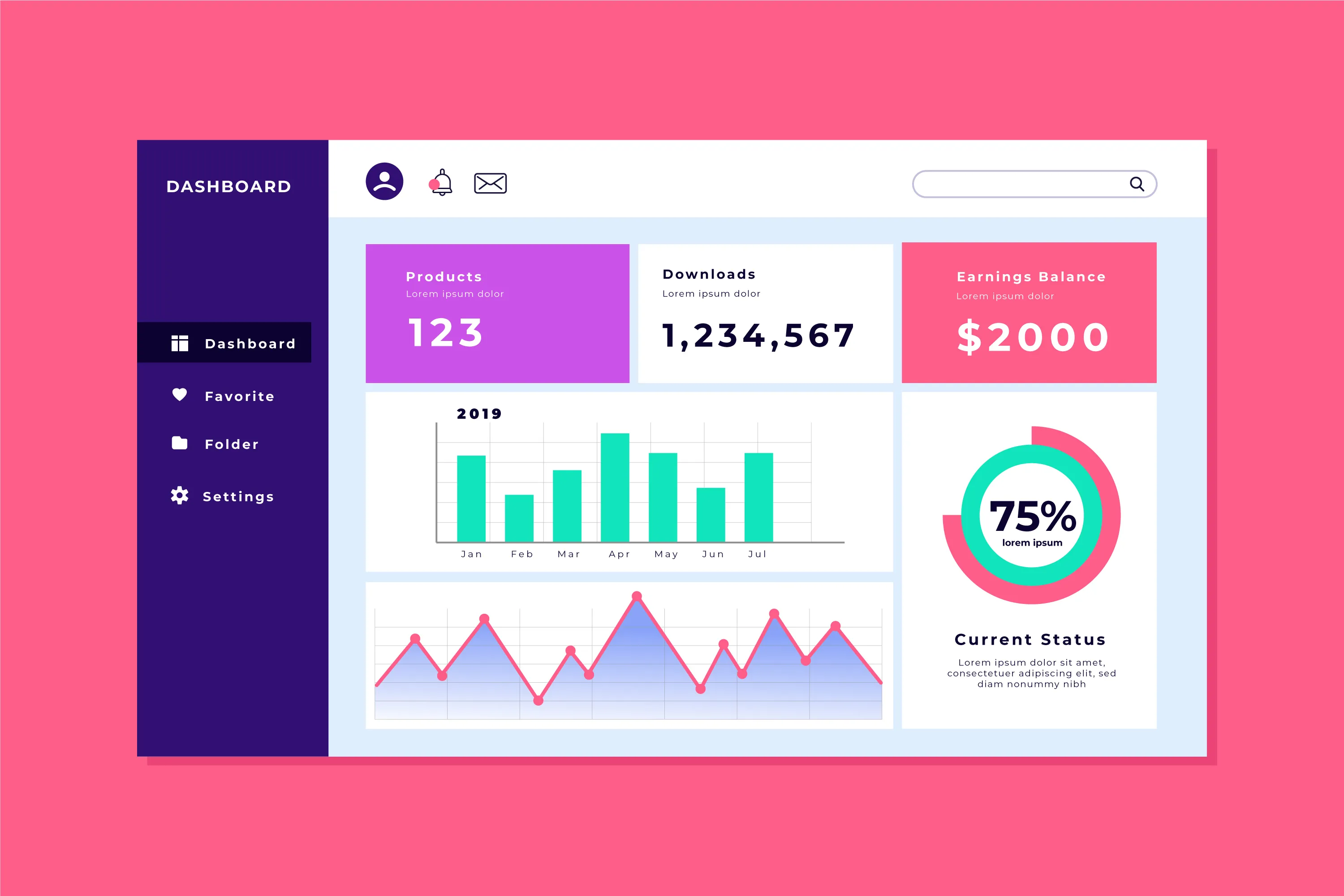
Admin dashboard of the marketplace showing:

Marketplace Admin Dashboard
Live
1,248
Vendor performance
Active Vendors
8,432
Orders
This Month
₹2.4L
Commissions
Collected
₹18.7L
Income
Platform Revenue
94%
Marketplace analytics
Growth Rate

Image filename: multi-vendor-marketplace-admin-dashboard.webp
Alt text: Admin dashboard of a multi-vendor marketplace with vendors, orders, commissions and marketplace analytics.

Translate Your Marketplace Concept into a Digital Business

Marketplace Development Solution

Start Small. Validate the Model. Build for Scale.

PerfectKode can help convert your business model into technology, be it launching a new B2B marketplace, updating an aged platform or building out a niche multi-vendor ecosystem.

Get a Quote